 Por Vitor Mattos
Envelopes: Batch document signing in LibreSign
LibreSign now supports Envelopes, a feature that allows multiple documents to be grouped and managed as a single signing process.
An envelope represents a logical container that holds one or more documents, enabling organizations to handle multi-document signing scenarios in a structured and transparent way, following practices already established in the digital signature market.
What is an Envelope?
An Envelope is a collection of documents that are sent together for signature and treated as one unified signing workflow.
Instead of managing each document individually, the envelope allows:
- A single signing request
- A shared set of signers
- A single signing process that shows the progress of all documents in one place
All documents inside an envelope belong to the same signing process and are not treated as independent signing requests.
Administrative control
Envelope usage in LibreSign is fully configurable by administrators.
Administrators can enable or disable envelope usage at the organization level, allowing each environment to decide whether multi-document signing workflows should be available.
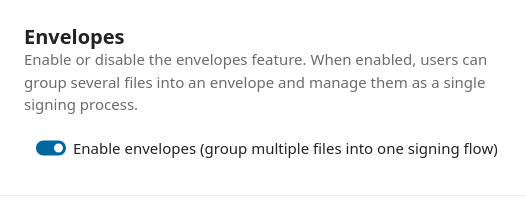
When envelopes are disabled, users are limited to single-document signing requests, ensuring that this feature is only available when it aligns with internal policies or operational requirements.
Editing and managing an envelope
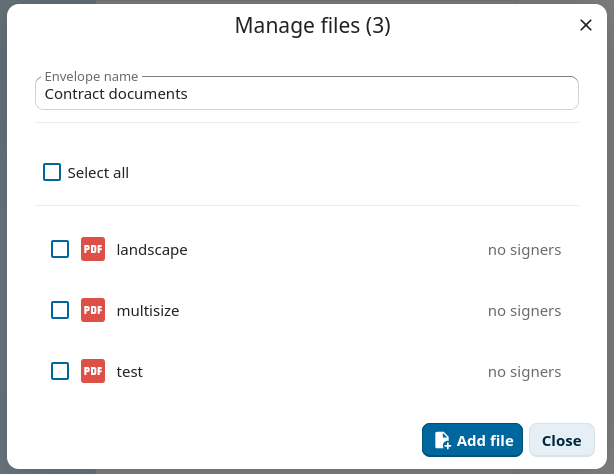
Once an envelope is created, LibreSign allows users to manage both its name and contents in a straightforward way.
Documents can be added, removed, or viewed directly from the envelope, making it easy to adjust the document set before or during the signing process.
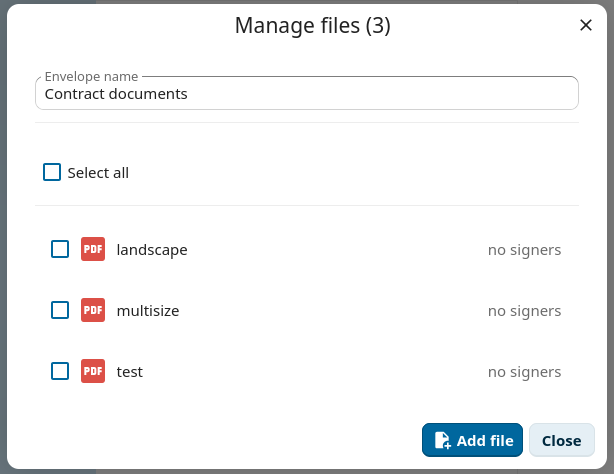
These changes apply to the envelope as a whole, without breaking or resetting the signing workflow.
Validation and transparency
LibreSign also provides a clear and transparent validation view for envelopes.
Each document inside the envelope keeps its own digital signatures and validation data, while the validation view makes it explicit that the documents belong to the same signing process.

This helps users, auditors, and external systems understand the relationship between documents without introducing proprietary or opaque mechanisms.